Back to Home

IntelliControl Platform

One Platform. Every Crane. Total Control.

Cloud-Connected Intelligence for Industrial Crane Systems

The IntelliControl webapp is a purpose-built industrial IoT platform that bridges crane PLC hardware to a secure, realtime cloud dashboard accessible from any browser, anywhere in the world. From live electrical readings to automated maintenance records, every part of your crane's operational life is logged, monitored, and actionable.
IntelliKran WebApp dashboard showing realtime crane data

Section 1 - Who Is This For?

The platform supports a structured hierarchy of users.

Super Admin

Full platform oversight: all devices, all users, infrastructure health, cloud sync, and OTA updates.

Admin / Distributor

Manages assigned IKS devices and end users, configures branding, and generates reports.

End User

Accesses owned device data including realtime values, history, maintenance, and spare parts.

Observer

Read-only access for inspectors, auditors, and third-party stakeholders.

Maintenance User

Dedicated access to maintenance reports and spare parts management.

User Role HierarchyIntelliKran Platform · 7 role types
LEVEL 1 · PLATFORM OWNERLEVEL 2 · OPERATORS & DEVICESLEVEL 3 · FIELD USERSSuper AdminFull platform controlL1Admin / DistributorManages devices & usersL2IKS Device / PLCMonitored crane unitL2Public PortalSelected documents onlyL2End UserDevice data & reportsL3ObserverRead-only stakeholderL3Maintenance UserMaintenance & spare partsL3
Super AdminAdmin / DistributorIKS Device / PLCPublic PortalEnd UserObserverMaintenance User

Section 2 - Device Types Supported

2A - IKS Devices (IntelliKran Safety Controller)

The core of the platform. Each IKS unit is a PLC installed on a crane, communicating over HTTPS with the cloud platform.
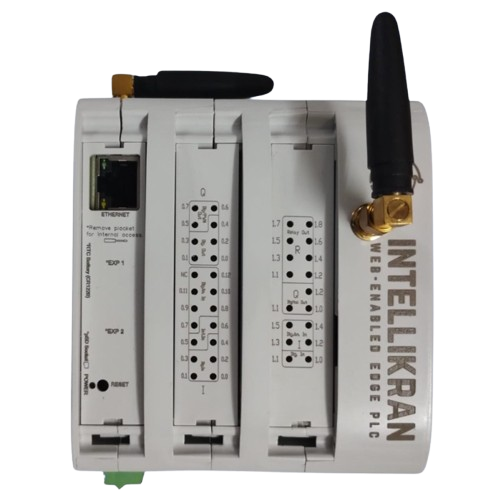
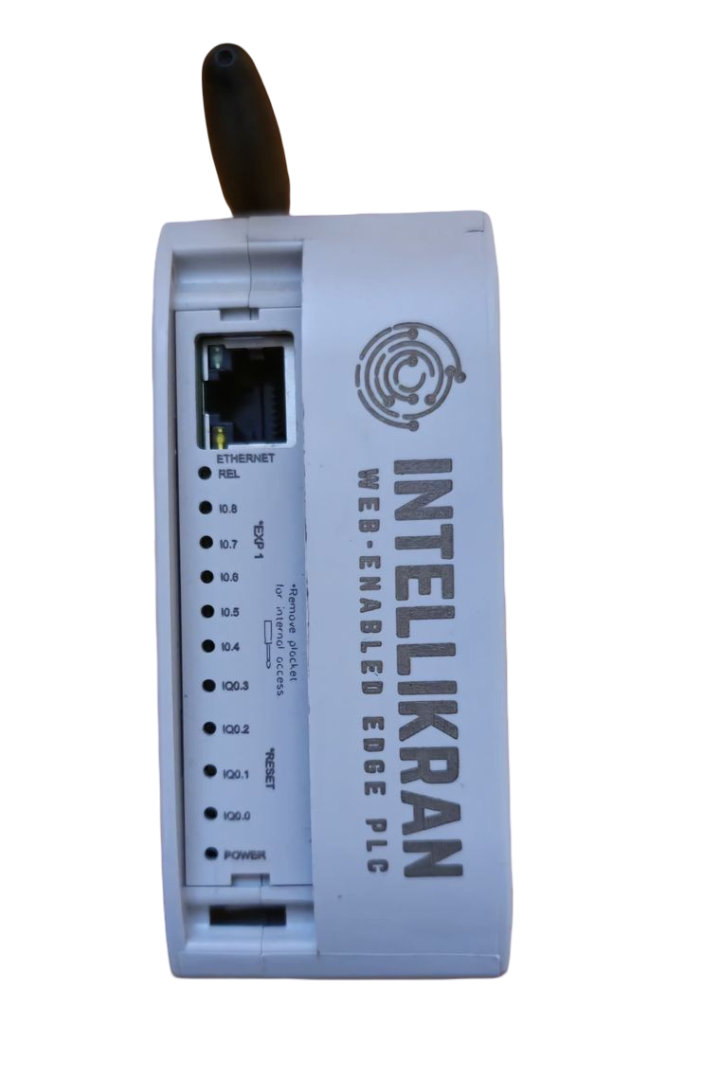
  • - Supports single and dual-hoist configurations (H1/H2), auxiliary hoisting (T1/T2), long-travel (LT), and dead-weight protection (DWP)
  • - Side-pull angle sensor monitoring per hoist
  • - Variable Frequency Drive (VFD) integration with fault code decoding
  • - Configurable crane capacity, serial number, location, and OEM metadata
IKS Max crane safety controllerIKS Mini crane safety controller

2B - MA Devices (Access Control Units)

A secondary device category for sites requiring crane access management.
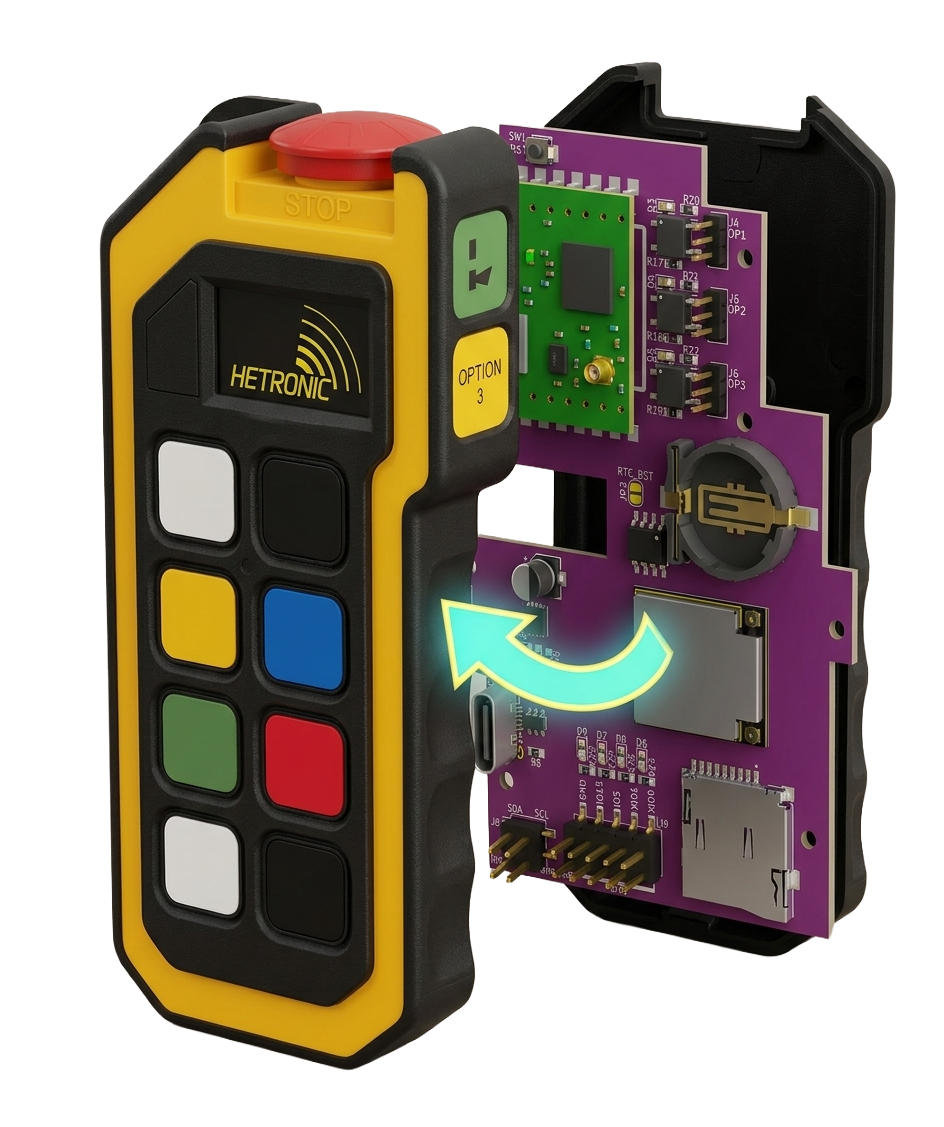
  • - RFID card reader with authorized/unauthorized access logging
  • - Realtime heartbeat monitoring with online/offline detection
  • - Searchable event history by UID, username, role, and date range
  • - CSV export for access logs and remote webserver activation over ESP-NOW
IKS MA access control unit

Section 3 - Realtime Monitoring

Live Data. No Delay.

The realtime page polls PLC data continuously and displays up-to-date electrical, mechanical, and safety values. Layouts are customizable and admins can enable or disable data sections per device.
Electrical (L1 / L2 / L3)

  • - Voltage (V), Current (A), and Power (W/kW)
  • - Live rolling charts over a 5-minute scrolling window
  • - Per-phase visibility for faster diagnostics
Realtime · Voltage
L1
L2
L3
5 min · V
4354204104003903803680:001:152:303:455:00

Mechanical (Per Hoist)

  • - Measured load in kg with circular gauge
  • - Load as percentage of rated capacity
  • - Side-pull X/Y and hoist angle sensor readings when fitted
Realtime · LoadHoist 1 (H1)
0%25%50%75%100%0%6.7 t / 10.0 t SWLLOAD % OF SWLNORMAL

System Outputs and I/O

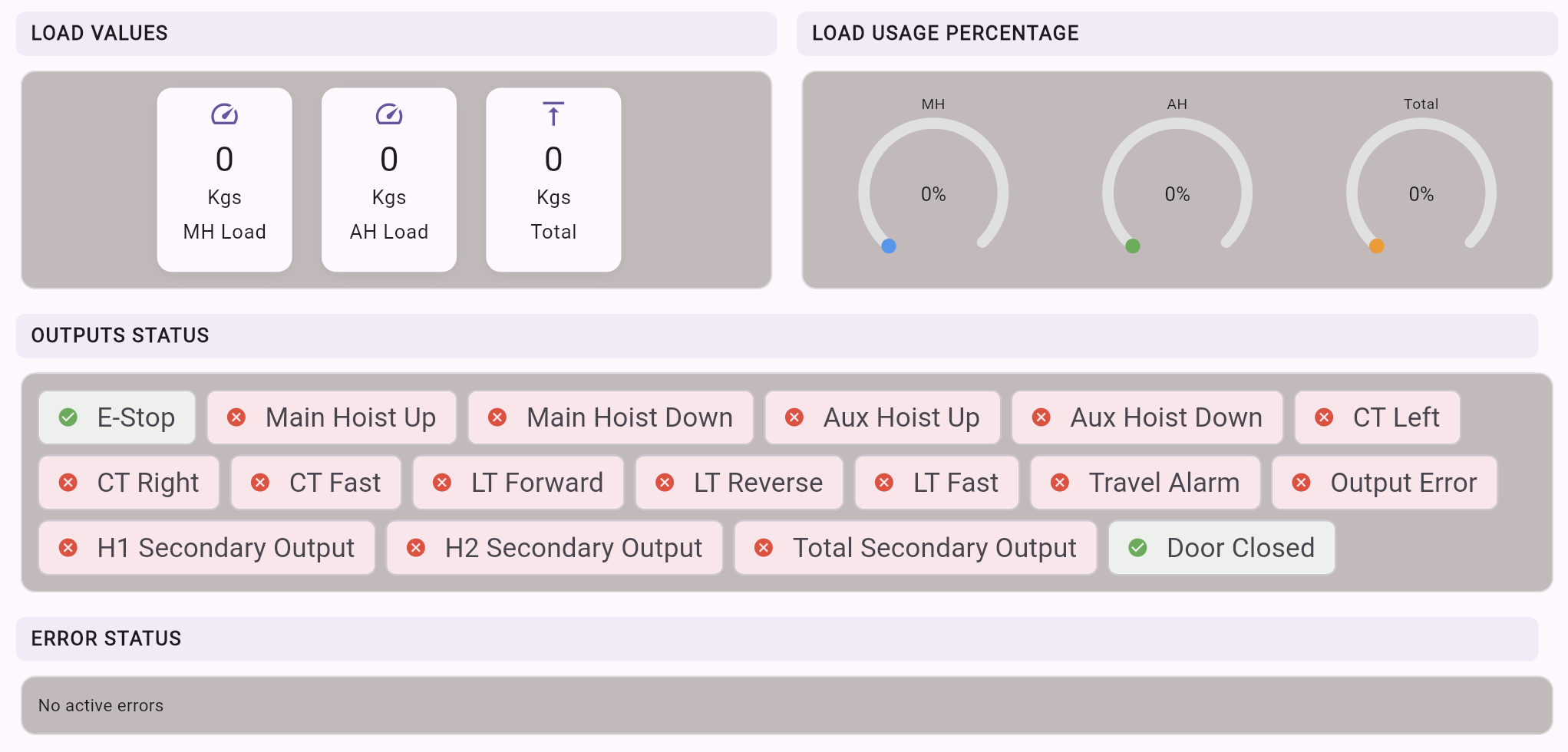
  • - Realtime output states (Emergency Stop, hoist up/down, speed states)
  • - Digital I/O tiles with clear on/off indicators
  • - Admin-controlled section visibility per device
Realtime system outputs and I/O screenshot

Active Faults, VFD, and Connectivity

  • - Active fault codes with labels and color coding
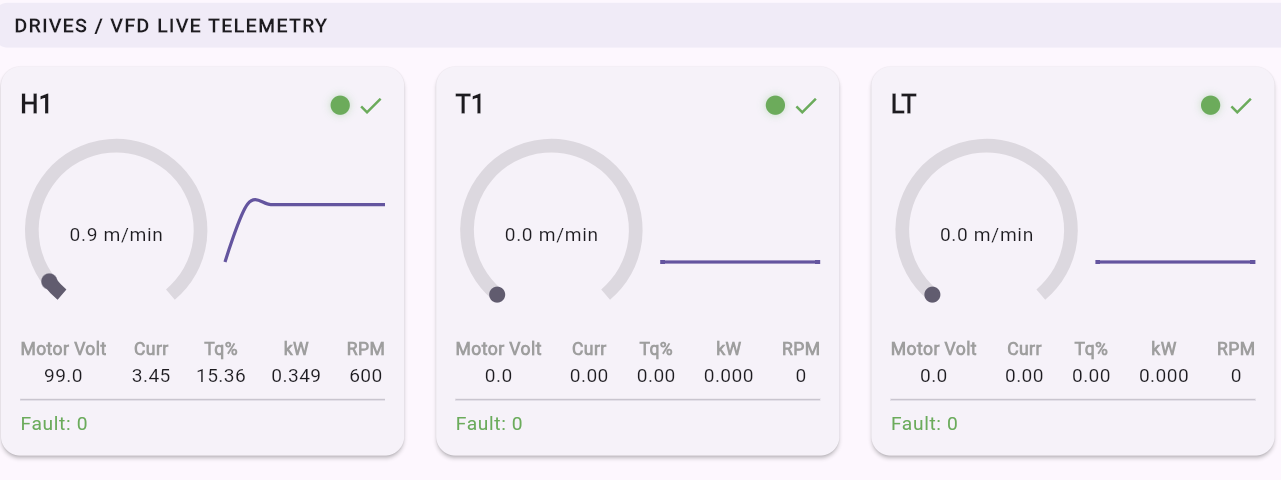
  • - Per-VFD state, frequency, and decoded fault descriptions
  • - Public IP with location, WiFi RSSI, and heartbeat online/offline status
Realtime VFD telemetry and connectivity screenshot

Section 4 - History and Analytics

Every Event Logged. Every Trend Visible.

4A - Load History

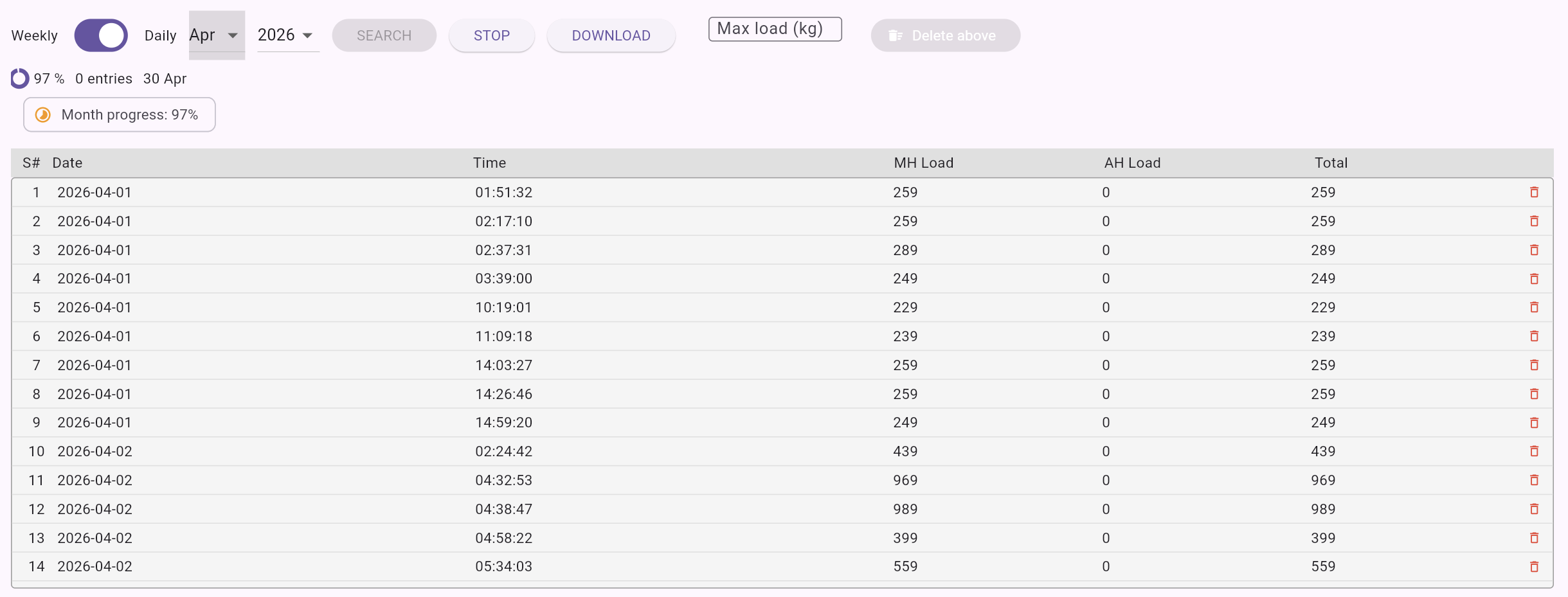
  • - Timestamped log of every load measurement, filterable by month and year
  • - Per-hoist (H1/H2) and combined total load values
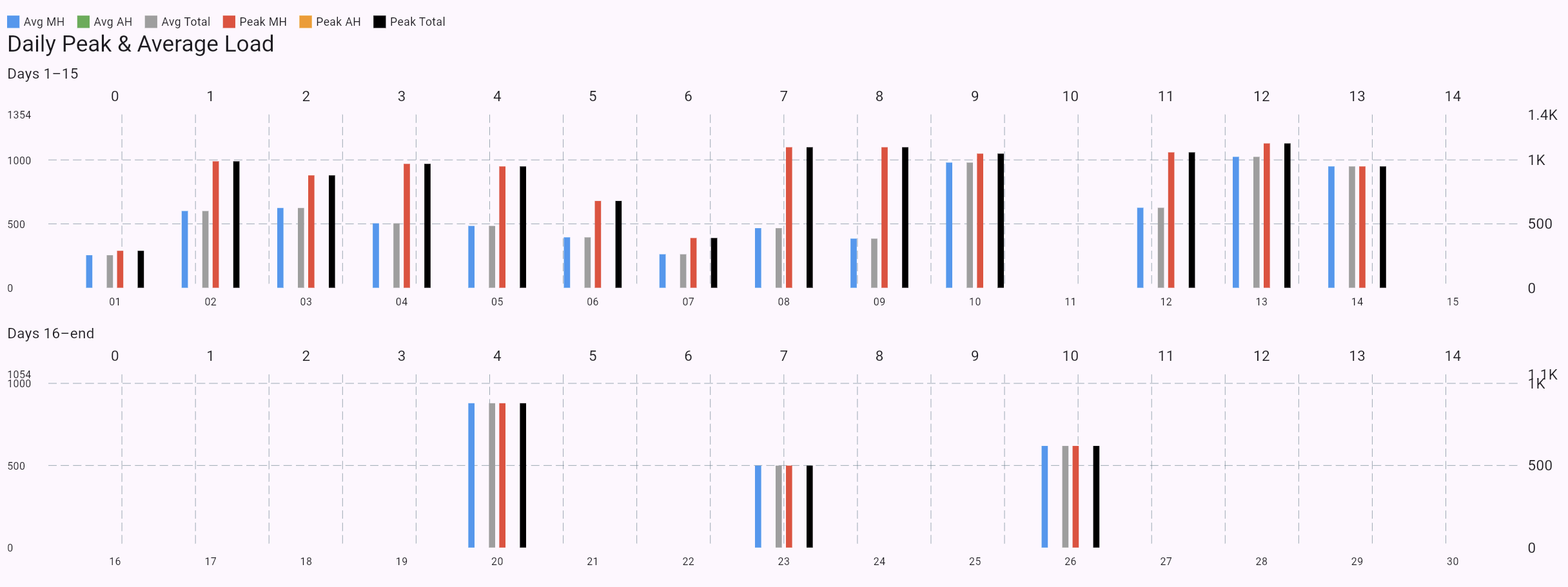
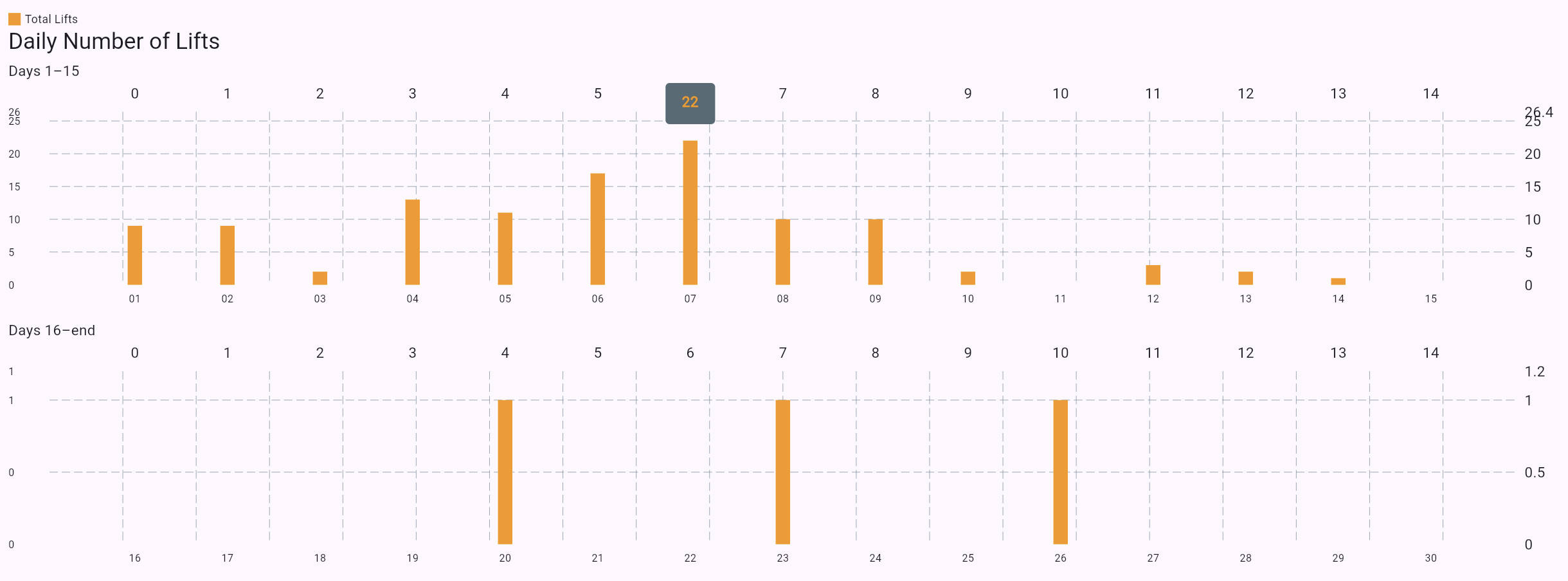
  • - Weekly summary cards with average, peak, and cycle count
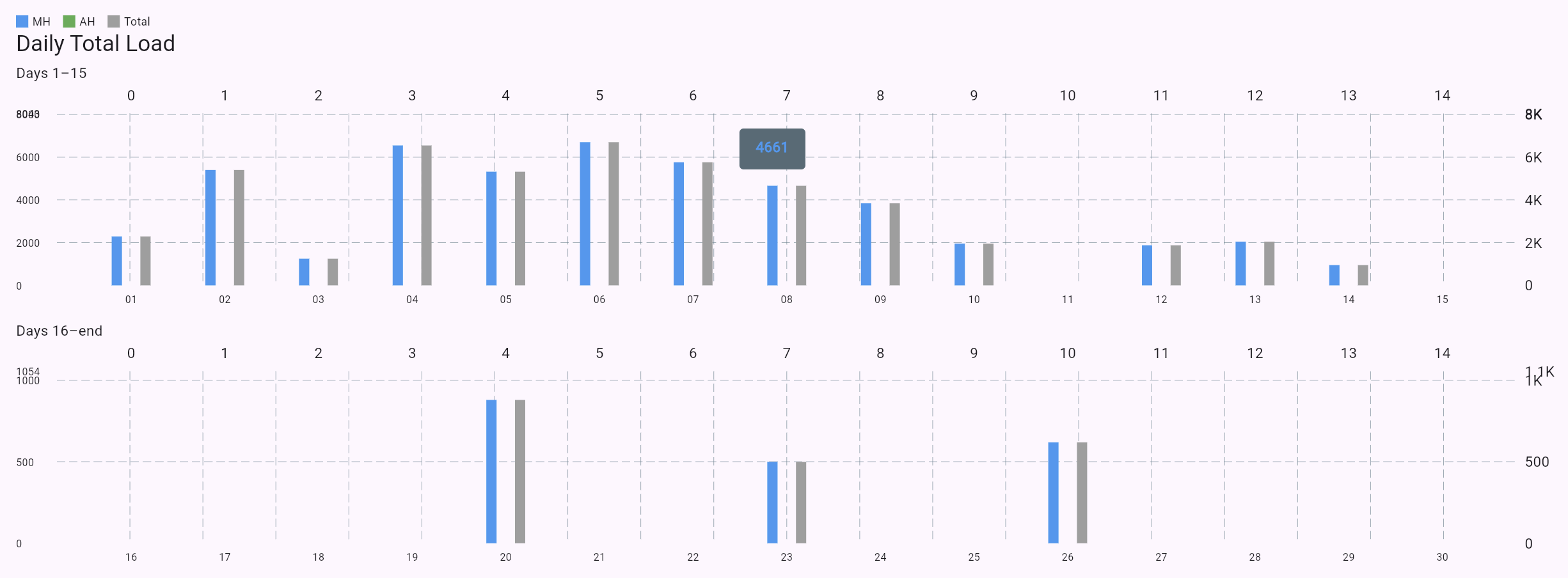
  • - Daily breakdown charts and CSV export
Load history page 1
Load history page 2
Load history page 3
Load history page 4

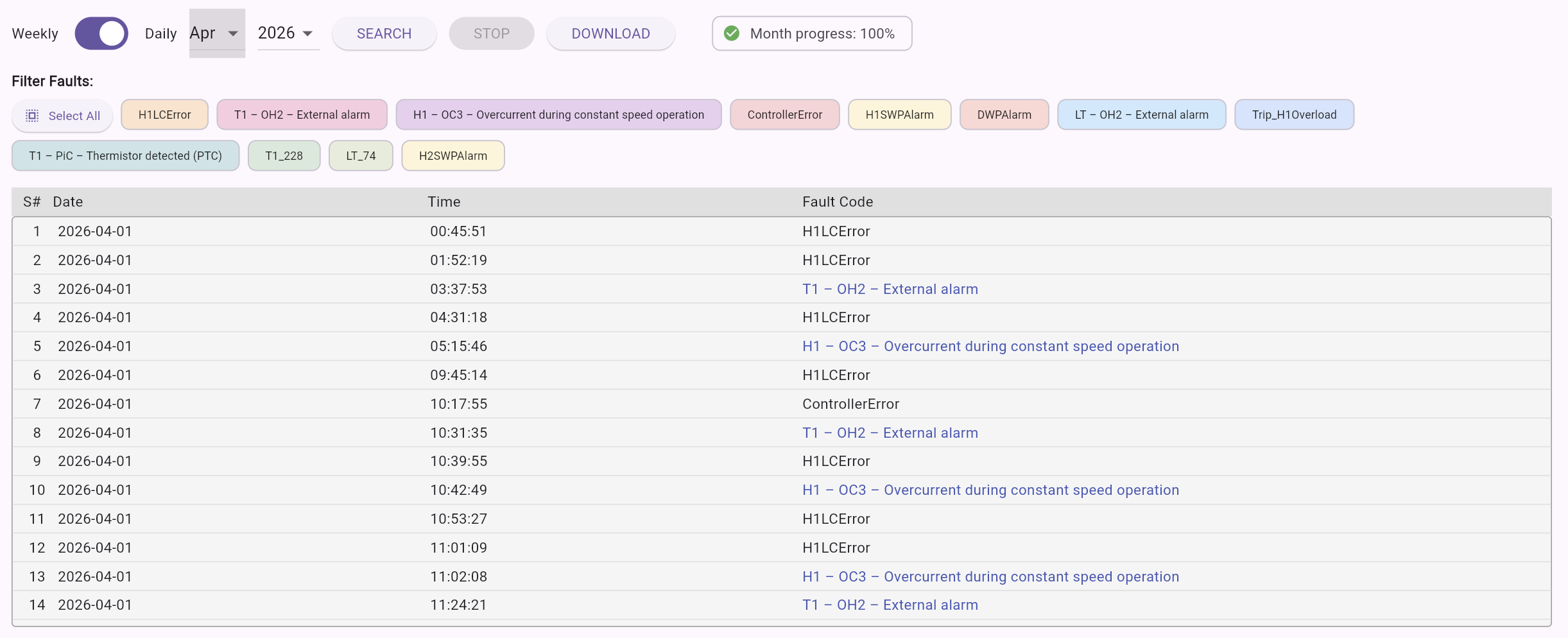
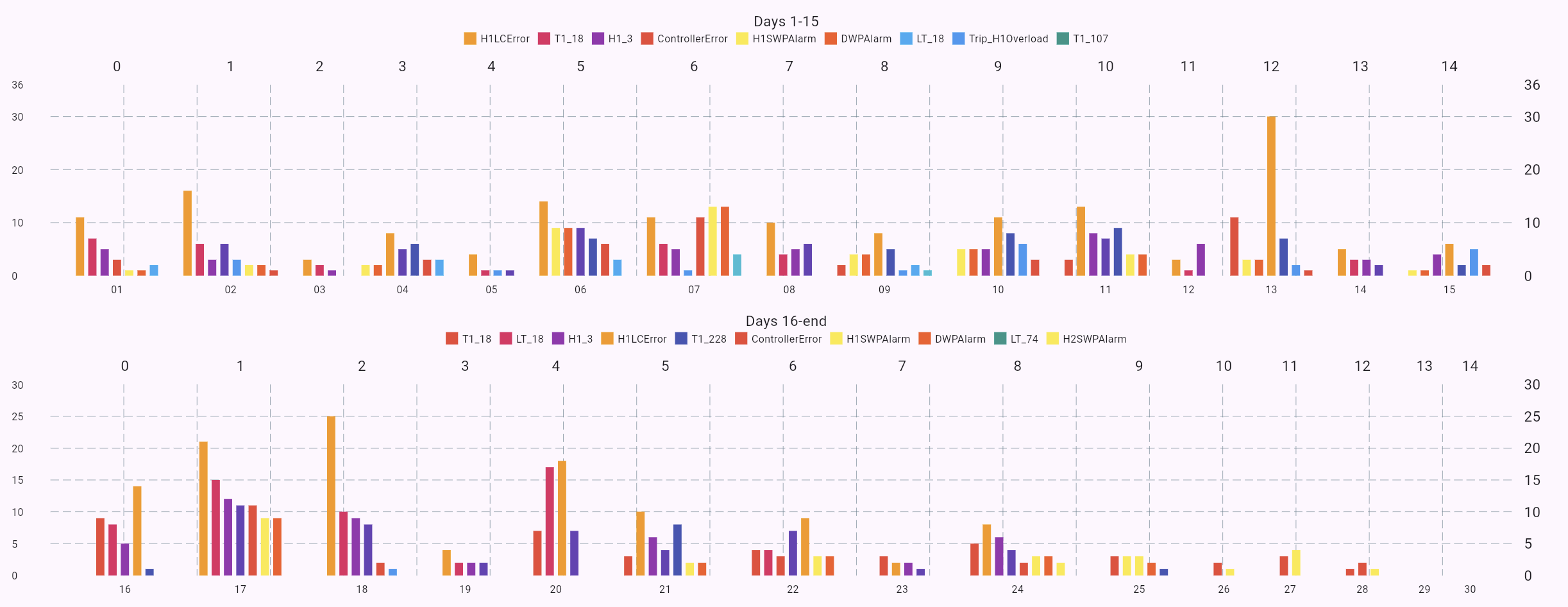
4B - Fault History

  • - Complete fault event log with timestamps
  • - Color-coded fault chips (overload, load cell, side-pull, temperature, and more)
  • - Filter by fault type and date range
  • - VFD-specific codes decoded into readable descriptions
Fault history page 1
Fault history page 2

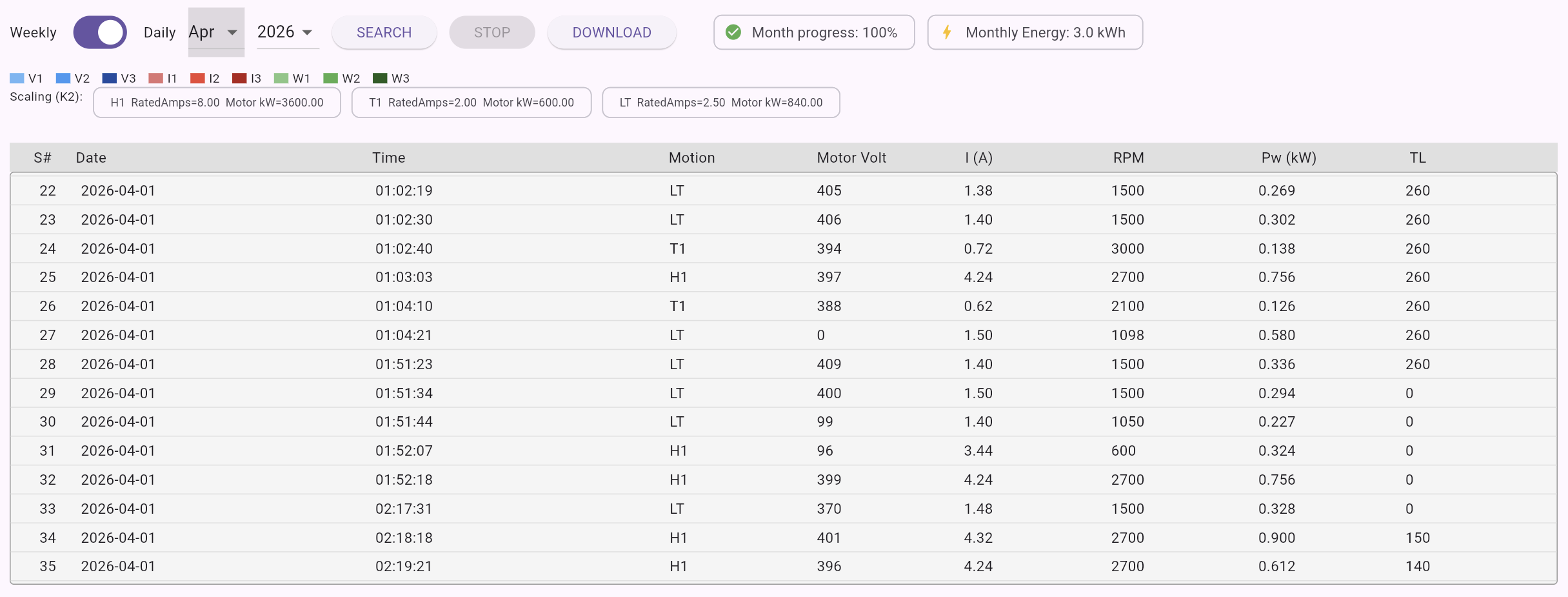
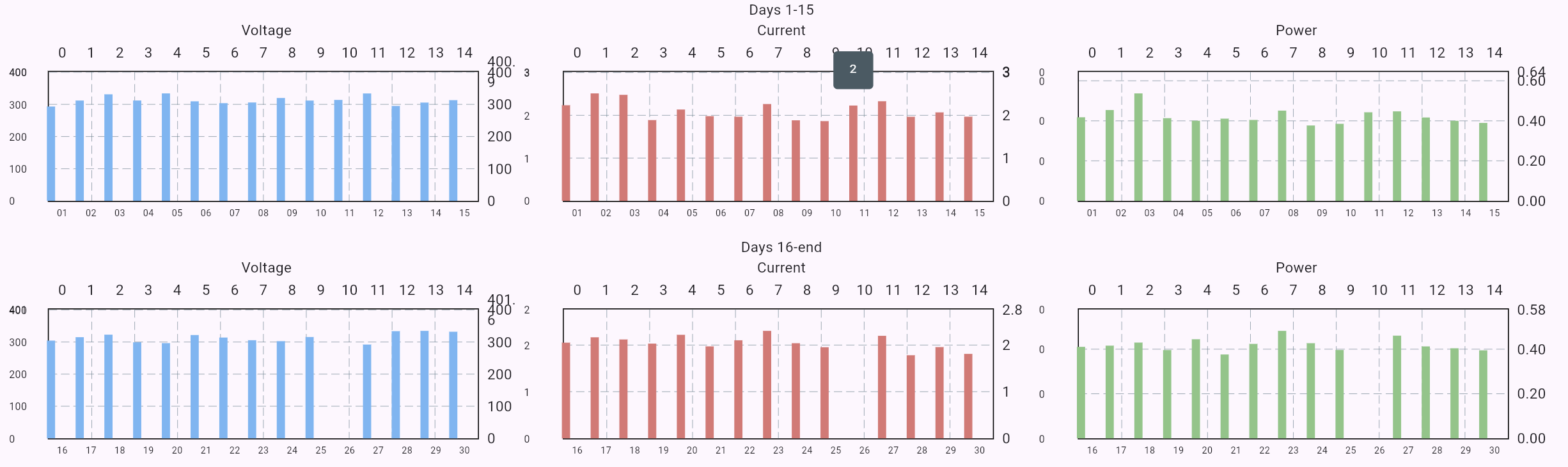
4C - Energy History

  • - Per-phase power and voltage trends over time
  • - Monthly energy consumption in kWh
  • - Daily per-phase voltage/current/power views
  • - Zero-power filtering to remove idle noise and cleaner analysis
Energy history page 1
Energy history page 2

4D - Settings Change History

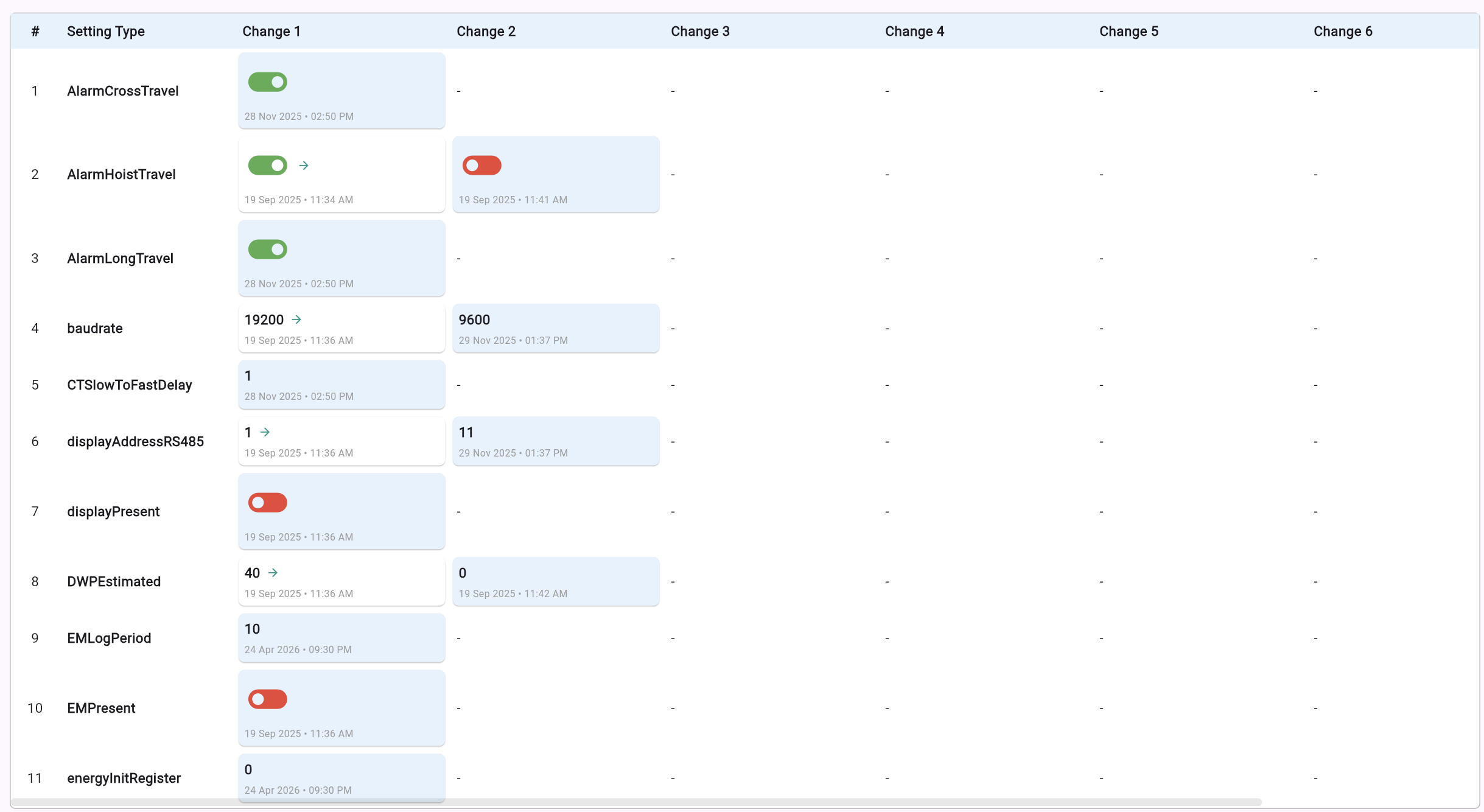
  • - Full audit trail of every PLC setting change
  • - Rows by variable and columns by recorded change event
  • - Includes changed value, timestamp, and admin user attribution
  • - Horizontally scrollable layout for dense data
Settings change history table screenshot

Section 5 - Operational Information

Lifecycle Metrics at a Glance

Live PLC counters are organized by mechanical component: Main Hoist (H1/H2), Auxiliary Hoist/Travel, and Load Test. Metrics include SWP measured/total/remaining, work time, overload counters, side-pull counters, slack-load counters, and work cycle counts.

Admins can enable or disable individual variables and sections per device.
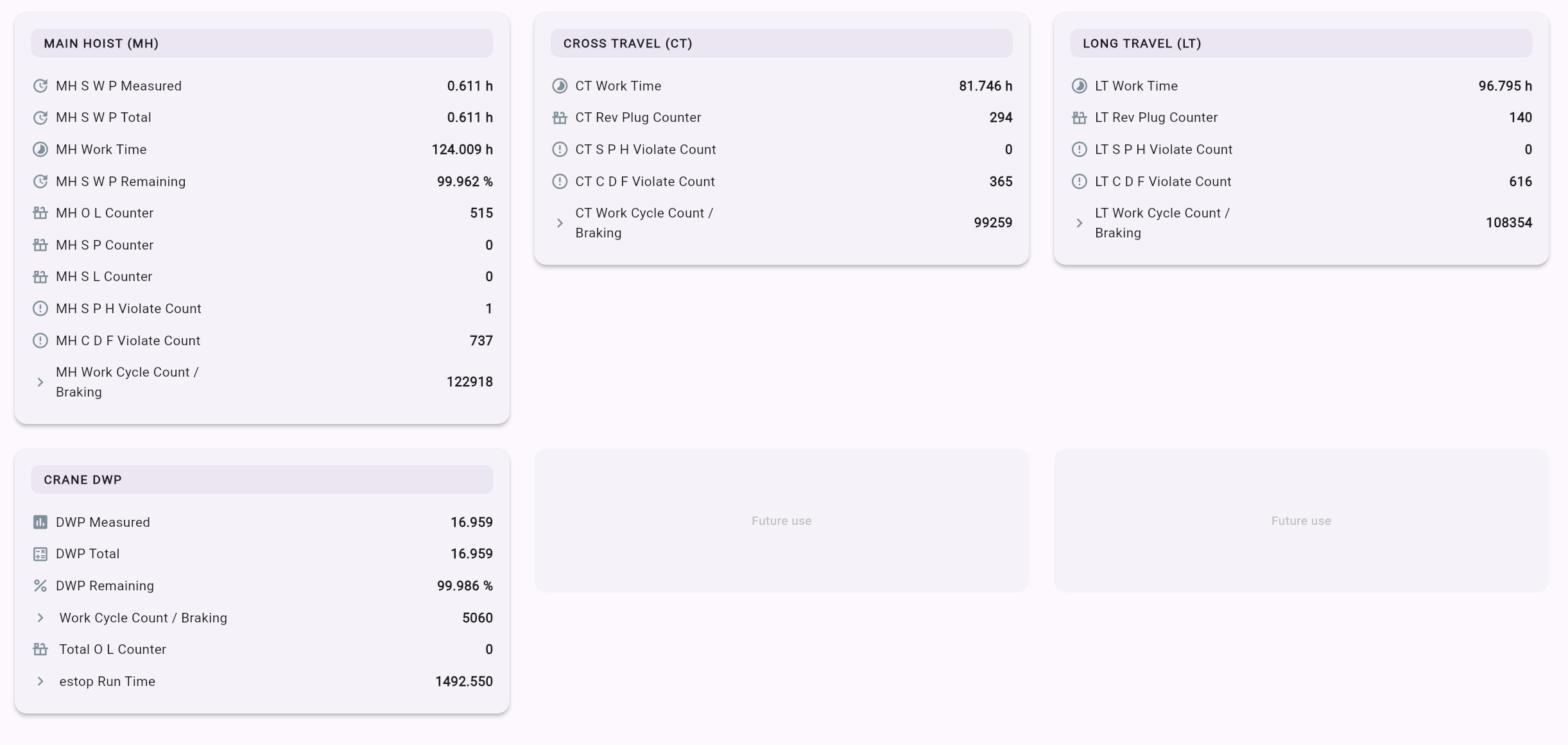
Operational information panel showing lifecycle metrics and counters

Section 6 - Maintenance and Spare Parts

Close the Loop Between the Cloud and the Workshop

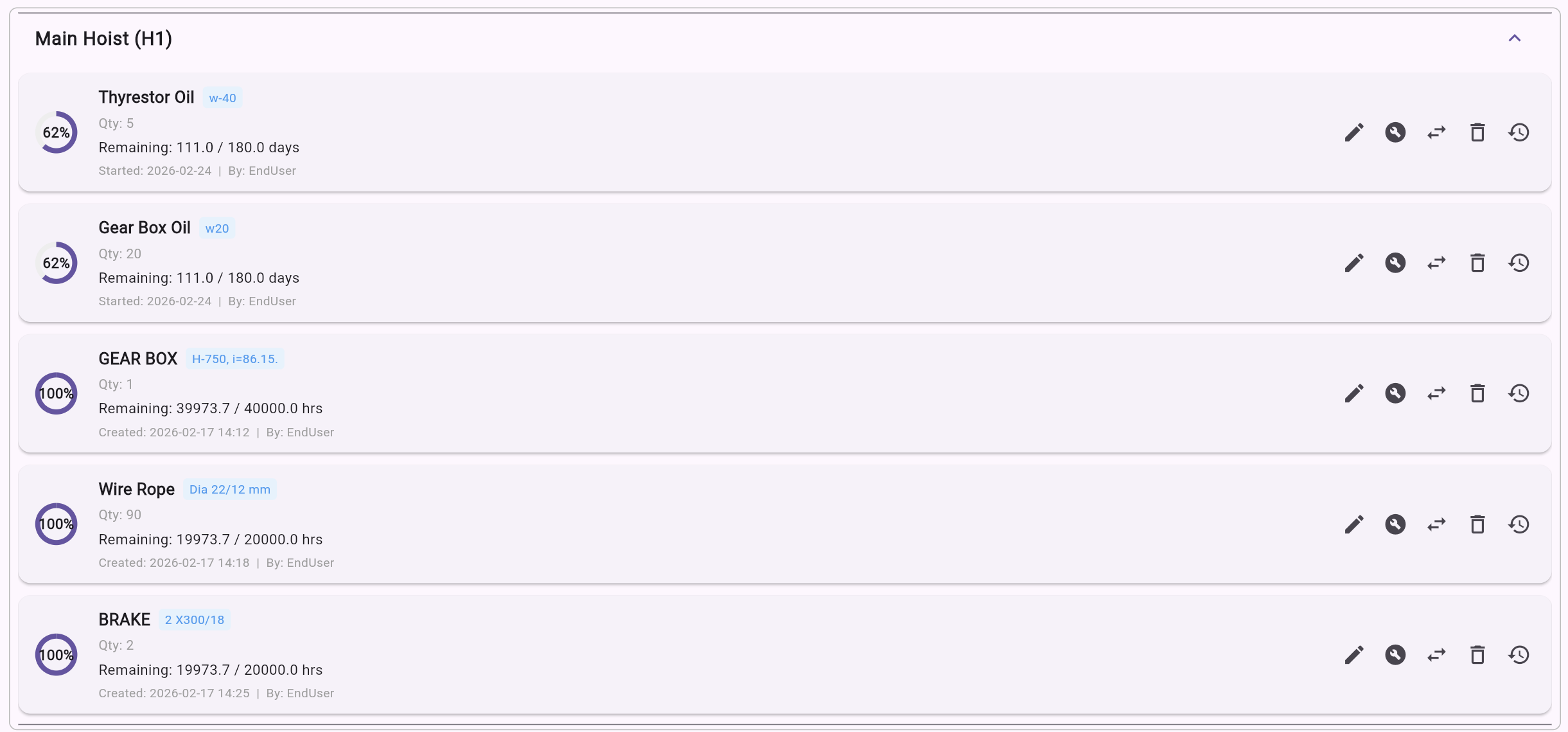
  • - 6A Spare Parts Tracker: life tracked from live usage counters with status as OK/Near Due/Overdue
  • - Thresholds configurable in cycles or days
  • - Replace/refurbish actions with timestamped history and admin templates
  • - 6B Maintenance Reports: structured reports with technician sign-off, read-only after registration
  • - Reports appear in device documents and sync to BigQuery for long-term analytics
Spare parts tracker showing remaining life and status per component

Section 7 - Documents and Reports

Every Document. In One Place.

  • - Device-specific repository per IKS unit
  • - Auto-generated PDF maintenance and load test reports
  • - Admin-uploaded manuals, certificates, and schematics
  • - Public document portal support for selected files
  • - Monthly/weekly report automation for loads, faults, and energy, with email delivery
Device Document RepositoryIKS-A2041 · 6 files
  • 🔧

    Maintenance Report — IKS-A2041

    PDF · Auto-generated · 14 Apr 2026

    Report
  • ⚖️

    Load Test Certificate — Q1 2026

    PDF · Auto-generated · 31 Mar 2026

    Certificate
  • 📘

    IKS Max — Installation Manual v3.2

    PDF · Admin-uploaded · 10 Jan 2026

    Manual
  • 📐

    Wiring Schematic — Panel A

    PDF · Admin-uploaded · 05 Feb 2026

    Schematic
  • April 2026 — Energy Report

    PDF · Automated · 01 May 2026

    Report
  • 🚨

    April 2026 — Fault Summary

    PDF · Automated · 01 May 2026

    Report
Automated Report ScheduleEmail delivery enabled
Load ReportMonthly
Next: 01 Jun 2026
Fault SummaryMonthly
Next: 01 Jun 2026
Energy ReportMonthly
Next: 01 Jun 2026
Fleet SummaryWeekly
Next: 12 May 2026

Reports auto-attached as PDF · Recipients configurable per device

Section 8 - Email Notification System

  • - Fault email alerts on new crane fault events
  • - Configurable recipients per device (admin and end user)
  • - Server health alerts to super admin for RAM/storage thresholds
  • - Full email audit log with delivery status, recipients, subject, and timestamp
IntelliControl · Notification Inbox5 alerts
  • FAULT ALERT09:14 AM

    Active Fault Detected — IKS #A2041

    Overload fault triggered on Hoist 1. Load: 12.4 t (124% SWL). Crane halted.

  • SPARE PARTS11:32 AM

    🔧Spare Part Near Expiry — Hoist Brake Pad

    Brake pad on H1 is at 91% life used. Remaining: ~230 cycles. Schedule replacement.

  • MONTHLY REPORT08:00 AM

    📊April 2026 — Load & Fault Summary Report

    Total lifts: 1,842. Peak load: 9.8 t. Faults: 3. Energy: 412 kWh. PDF attached.

  • SERVER HEALTH03:45 AM

    🖥️Cloud Server Alert — Storage at 82%

    Storage threshold exceeded on us-central1. Auto-archive triggered for logs >90 days.

  • WEEKLY REPORT07:00 AM

    📅Week 17 Energy Report — IKS Fleet

    Total energy consumption: 98.3 kWh across 4 devices. L3 voltage dip flagged on IKS #B119.

Delivered via ZeptoMail · Logged in Firestore● All systems operational

Section 9 - Backend Infrastructure

Enterprise-Grade Backend. Zero Maintenance Overhead.

Cloud Stack

  • - Firebase Authentication for secure role-based login
  • - Cloud Firestore for device, user, report, and spare parts data
  • - Firebase RTDB for low-latency telemetry, heartbeat, and RFID events
  • - Firebase Cloud Functions for sync jobs, BigQuery exports, and email dispatch
  • - Google BigQuery for long-term time-series analytics
  • - Google Cloud Tasks for scheduled and queued background jobs

Data Sync Architecture

  • - Automatic scheduled sync jobs push PLC history to cloud
  • - Offline resilience with local PLC cache and catch-up sync
  • - BigQuery sync enables fleet-level warehouse analytics
  • - OTA firmware update configuration for individual devices or groups
Cloud ArchitecturePLC → Firebase → BigQuery → WebApp
HARDWAREFIREBASE LAYERSTORAGE & ANALYTICSCLIENTIKS PLCOn-crane hardwareFirebase RTDBRealtime telemetryCloud FunctionsSync · Email · OTAFirebase AuthRole-based loginFirestoreDevice & user dataBigQueryLong-term analyticsCloud StorageDocs & PDFsWebAppBrowser
Realtime data
Analytics sync
Functions / jobs
Auth / docs

Sections 10 and 11

10 - White-Label and Multi-Tenant Architecture

  • - Distributor/admin-specific brand setup (logo, colors, company name, landing page)
  • - End users only see their distributor branding
  • - Login page background, typography, and layout configurable per brand
  • - Device cards include crane serial number and OEM/customer metadata
White-Label Brand ConfigMulti-Tenant · Per-Distributor

Brand Settings Panel

Company Name
Tagline
Primary Color
Logo
BG Style

Live Login Page Previews

AC

AceCo Lifting

Precision. Power. Control.

Sign in →
KT

KranTech GmbH

Sicherheit durch Innovation.

Sign in →
CS

CranSud SARL

Solutions de levage intelligentes.

Sign in →

Each distributor sees only their own branding · End users never see IntelliControl

11 - PLC and Fleet Health Dashboard (Super Admin)

  • - Aggregated boot history with power-on, software, watchdog, and panic restarts
  • - Configurable analysis windows (7/14/30 days)
  • - Device health score sorted most-critical-first
  • - Server disk and RAM threshold monitoring with alerts
  • - Login history visibility per user across all devices
PLC Fleet Health · 30-Day Window
Power-on
Software
Watchdog
Panic
IKS-A2041
97 /100
2x
RAM
31%
Disk
18%
IKS-B1190
84 /100
8x
RAM
58%
Disk
41%
IKS-C0387
71 /100
13x
RAM
72%
Disk
63%
IKS-D5521
55 /100
16x
RAM
88%
Disk
79%
IKS-E0042
38 /100
20x
RAM
94%
Disk
87%
Sorted by health score · Most critical first
3 online2 offline

Closing Section - Summary Stats

IKS Devices Connected

0+

Countries Deployed

0

Events Logged

0K+

Platform Uptime

0%

Global Deployments3 countries
UAESaudi ArabiaIndia
UAE
Saudi Arabia
India